Control where your AI agents can browse with Chrome enterprise policies on Amazon Bedrock AgentCore

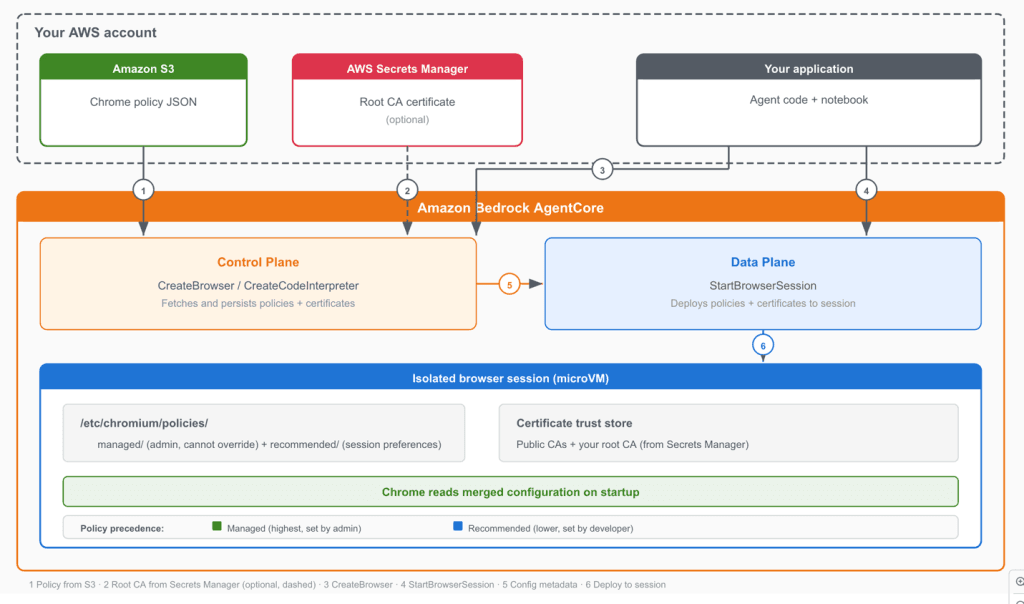
Artificial Intelligence Control where your AI agents can browse with Chrome enterprise policies on Amazon Bedrock AgentCore AI agents with unrestricted web access pose significant security risks. Without Chrome enterprise policies to control browser behavior, an agent might navigate to unauthorized domains, store credentials in the browser’s password manager, or download files outside approved workflows. Organizations with internal services that use a private certificate authority (CA) face an additional barrier. Every HTTPS connection to those services fails with certificate validation errors. Amazon Bedrock AgentCore Browser now supports Chrome enterprise policies and custom root CA certificates to give organizations granular control over agent browser behavior and connectivity. With Chrome policies, you can configure over 450 browser settings, including URL filtering, download restrictions, and password manager controls, applied through familiar Chrome enterprise JSON configuration. Custom root CA support lets your agents connect to internal services and work with corporate SSL-intercepting proxies by trusting your organization’s certificate authority. For the full reference of available settings, see the Chrome Enterprise policy list. In this post, you will configure Chrome enterprise policies to restrict a browser agent to a specific website, observe the policy enforcement through session recording, and demonstrate custom root CA certificates using a public test site. The walkthrough produces a working solution that researches Amazon Bedrock AgentCore documentation while operating under enterprise browser restrictions. Why enforce browser policies for AI agents Chrome enterprise policies address three organizational needs when applied to AI browser agents. First, you can restrict agent scope to approved domains. URL allowlists and denylists limit where agents can navigate. An agent tasked with processing invoices on a specific portal doesn’t need access to social media or search engines. Policies enforce these boundaries at the browser level, independent of the agent’s prompt or reasoning. Second, you can disable risky browser features. With Chrome policies, you can turn off the password manager, block file downloads, disable autofill, and control dozens of other browser capabilities. For data-entry agents that interact with sensitive systems, these controls reduce the risk of unintended data storage or exfiltration. Third, you can separate policy management from agent development. Managed policies are configured at the browser level through the control plane API and apply to every session created from that browser. This lets your security team define approved browser configurations while your development team focuses on agent logic, without embedding policy decisions in application code. How Chrome policies and root CA certificates are applied The integration has two layers of policy enforcement and an optional certificate trust configuration. Managed policies operate at the browser level. You provide Chrome enterprise policy JSON files stored in Amazon Simple Storage Service (Amazon S3) when creating a browser through the control plane API. These policies are stored by the service and enforced on every session created from that browser. Managed policies map to Chrome’s /etc/chromium/policies/managed/ directory. They can’t be overridden by session-level settings. Recommended policies operate at the session level. You can optionally provide additional policy JSON files when starting a browser…