Secure short-term GPU capacity for ML workloads with EC2 Capacity Blocks for ML and SageMaker training plans
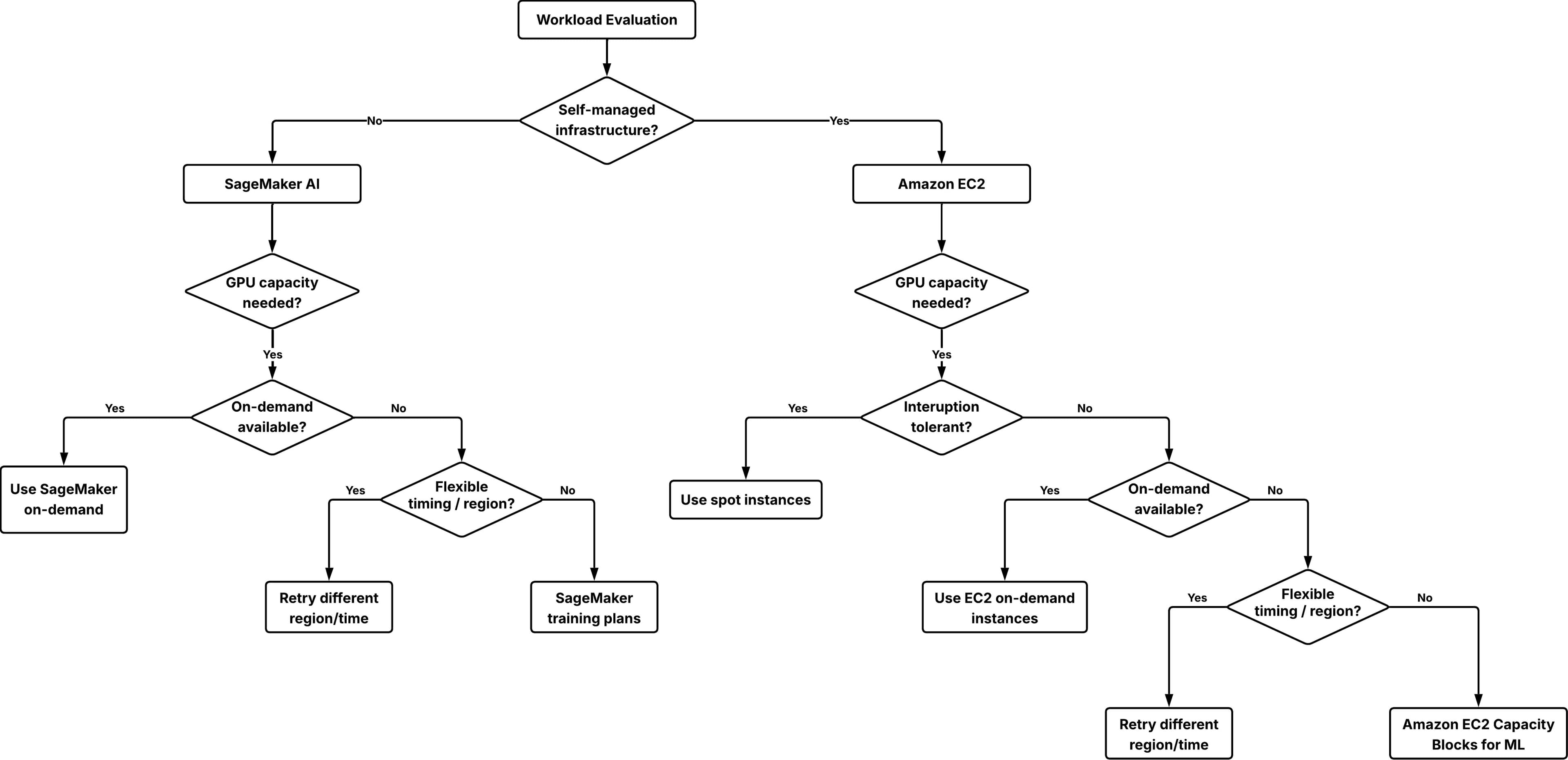
Artificial Intelligence Secure short-term GPU capacity for ML workloads with EC2 Capacity Blocks for ML and SageMaker training plans As companies of various sizes adopt graphic processing units (GPU)-based machine learning (ML) training, fine-tuning and inference workloads, the demand for GPU capacity has outpaced industry-wide supply. This imbalance has made GPUs a scarce resource, creating a challenge for customers who need reliable access to GPU compute resources for their ML workloads. When you encounter GPU capacity limitations, you might consider creating on-demand capacity reservations (ODCRs). ODCRs apply to planned, steady-state workloads with well-understood usage patterns. Short-term ODCR availability for GPU instances, particularly P-type instances, is often limited. Additionally, without a long-term contract, ODCRs are billed at on-demand rates, offering no cost advantage. This makes ODCRs unsuitable for short or exploratory workloads such as testing, evaluations, or events. A guided approach to secure short-term GPU capacity becomes necessary. In this post, you will learn how to secure reserved GPU capacity for short-term workloads using Amazon Elastic Compute Cloud (Amazon EC2) Capacity Blocks for ML and Amazon SageMaker training plans. These solutions can address GPU availability challenges when you need short-term capacity for load testing, model validation, time-bound workshops, or preparing inference capacity ahead of a release. Solution overview and short-term GPU options There are several ways to access GPU capacity on AWS for short-term workloads: On-demand GPU instances On-demand instances are usually the first option for short-term GPU usage. If capacity is available at launch time, you can start using GPU instances immediately without prior commitment. This works well for ad hoc experiments, short tests and development tasks. On-demand GPU capacity depends on regional supply and current demand, and availability can change quickly. If you stop or scale down an instance, you might not be able to reacquire the same capacity when needed again. This uncertainty often leads to keeping GPU instances running longer than needed, which can increase cost. Choose on-demand instances when your workload can tolerate potential launch delays or when timing is flexible. Spot GPU instances Spot instances can reduce your GPU compute costs by up to 90%, but they trade cost saving for availability certainty. Spot capacity depends on unused capacity in the AWS Region. Instances can be interrupted when Amazon EC2 needs the capacity back, thus spot instances are suitable only for workloads that can handle interruption. For ML workloads, spot instances work well when you can checkpoint progress and restart. Recommended use cases include distributed training jobs with periodic checkpoints, batch inference workloads that can be retried, and workshop environments that are designed to tolerate partial capacity. Amazon EC2 Capacity Blocks for ML Amazon EC2 Capacity Blocks for ML reserves GPU capacity for a specific time window so that the requested instances will be available when you launch them during the reserved period. Unlike ODCRs, Capacity Blocks are fully self-service and offer better short-term availability for GPU instances with a 40-50% discounted rate. Each Capacity Block represents a reservation of a specific number of a…