From siloed data to unified insights: Cross-account Athena Access for Amazon Quick

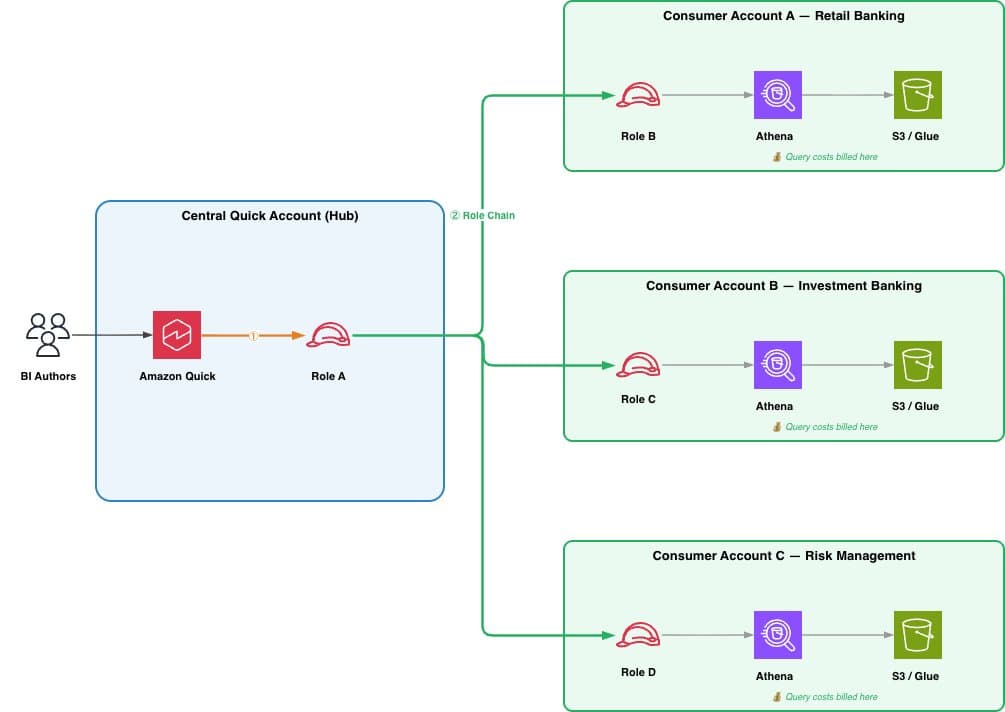
Artificial Intelligence From siloed data to unified insights: Cross-account Athena Access for Amazon Quick Amazon Quick is an AI-powered unified intelligence service that brings together an organization’s data, structured data and unstructured enterprise content like documents, emails, and knowledge bases into a single service where anyone can explore, analyze, and take action. With over 40 application integrations, Quick bridges the last-mile gap between insights and action so users can understand their data and act on it directly. Amazon Quick Sight, the business intelligence (BI) capability of Amazon Quick, is a unified BI service. It provides modern interactive dashboards, natural language querying, pixel-perfect reports, machine learning (ML) insights, and embedded analytics at scale. Amazon Quick brings together AI agents for business insights, research, and automation in one integrated experience, helping you work smarter and faster while maintaining security and access policies. Amazon Athena is a serverless, interactive query service that’s used to analyze data directly in Amazon Simple Storage Service (Amazon S3) using standard SQL, with no infrastructure to manage and no data to load. You point Athena at your data stored in Amazon S3, define the schema using the AWS Glue Data Catalog, and start querying. Many enterprises centralize their Amazon Quick deployment in a single AWS account while their data resides across multiple business unit accounts. A financial services company might run Quick in a central AWS account, while retail banking data lives in Account A, investment banking in Account B, and risk management in Account C. Until now, querying Amazon Athena data across these accounts meant either managing multiple Quick subscriptions or absorbing all query costs in the central account. Today, we’re announcing cross-account Athena access for Amazon Quick. With this feature, customers can query Athena data in other AWS accounts using AWS Identity and Access Management (IAM) role chaining, with query costs billed to the account where the data resides. In the context of cross-account Athena access, role chaining enables Amazon Quick in a publisher account to assume a role in the customer’s consumer account, which in turn has permissions to query data in Athena and the AWS Glue Data Catalog without sharing long-term credentials across account boundaries. In this post, we walk through the end-to-end setup: creating the IAM roles, configuring trust policies, creating the cross-account data source in Quick, and building datasets from it. Term definitions - Central Quick Account (Source Account): The AWS account where Amazon Quick is deployed - Consumer Account: An AWS account where Athena data assets (databases, tables, S3 data) reside, accessed from the central Quick account - RunAsRole (Role A): An IAM role in the central Quick account that Quick assumes first; holds no data permissions, only permission to chain into consumer account roles - Consumer Account Role (Role B): An IAM role in each consumer account that grants Athena, AWS Glue, and S3 access; trusts Role A - Role Chaining: A two-step credential process where Quick assumes the RunAsRole, then uses those credentials to assume the consumer account role…