Fine-tune LLM with Databricks Unity Catalog and Amazon SageMaker AI
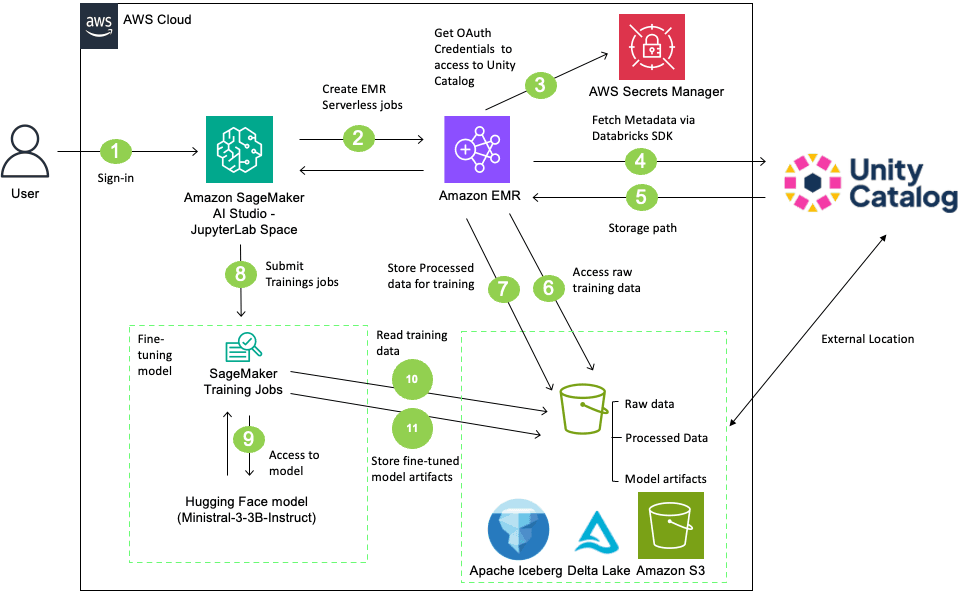
Artificial Intelligence Fine-tune LLM with Databricks Unity Catalog and Amazon SageMaker AI When you fine-tune large language models (LLMs) with Amazon SageMaker AI while using Databricks Unity Catalog, you might face unique challenges like how to maintain strict data governance while using best-in-class machine learning (ML) services. Unity Catalog governs metadata and permissions, while the underlying data resides in Amazon Simple Storage Service (Amazon S3) when you choose AWS as the cloud environment for their Databricks Workspace. When SageMaker AI Training job accesses that data, you must preserve and not bypass the Unity Catalog’s fine-grained authorization model. Without a structured integration pattern, you risk inconsistent policy enforcement, audit gaps, and compliance exposure. For example, if SageMaker AI Training jobs bypass Unity Catalog’s authorization model when reading S3 objects, you lose visibility into which data trained which models. This creates critical compliance risks particularly in regulated industries and production workloads. In this post, we demonstrate how to build a secure, complete LLM fine-tuning workflow that integrates Unity Catalog with Amazon SageMaker AI using Amazon EMR Serverless for preprocessing. The solution shows how to securely access governed data, maintain lineage across services, fine-tune the Ministral-3-3B-Instruct model, and register trained artifacts back into Unity Catalog. With this approach, you can continue using your existing services while preserving central governance, tracking data lineage without compromising security or compliance requirements. Solution overview The workflow described in this post accomplishes the following: - Reads training data from a Unity Catalog managed table with proper governance controls - Preprocesses the data using EMR Serverless with Apache Spark - Fine-tunes a Ministral-3-3B-Instruct model using SageMaker AI Training jobs - Tracks data lineage in Unity Catalog from source data through to the trained model The following diagram illustrates the architecture: In this solution, users sign in to SageMaker AI Studio and initiate data preprocessing using an EMR Serverless job. The EMR Serverless job accesses and processes data from a Unity Catalog-managed S3 bucket using Unity Catalog’s Open REST APIs with OAuth credentials stored in AWS Secrets Manager. After processing the data, create a table in the Unity Catalog with the processed data. Then, SageMaker AI training job retrieves the Ministral-3-3B-Instruct model from Hugging Face, fine-tunes it on the processed table, and stores the resulting model artifacts back to the Unity Catalog-managed S3 bucket. Finally, register the model in Unity Catalog and create external data lineage. This complete workflow integrates SageMaker AI, EMR Serverless, and Databricks Unity Catalog for governed, scalable LLM fine-tuning. Prerequisites Before you begin, verify that you have the following: Walkthrough This section walks through the complete process for fine-tuning LLM using data that Unity Catalog governs. Download the complete notebook LLM_Finetunig_SageMaker_AI_Unity_Catalog.ipynb and run it in SageMaker AI Studio using the following steps: - Navigate to the Amazon SageMaker AI Console. - Create a SageMaker Studio Domain using Quick Setup (if you don’t have existing domain). - Log in to SageMaker AI Studio. - Create a JupyterLab Space with the following configuration - Instance Type: ml.m5.2xlarge -…