Introducing granular cost attribution for Amazon Bedrock

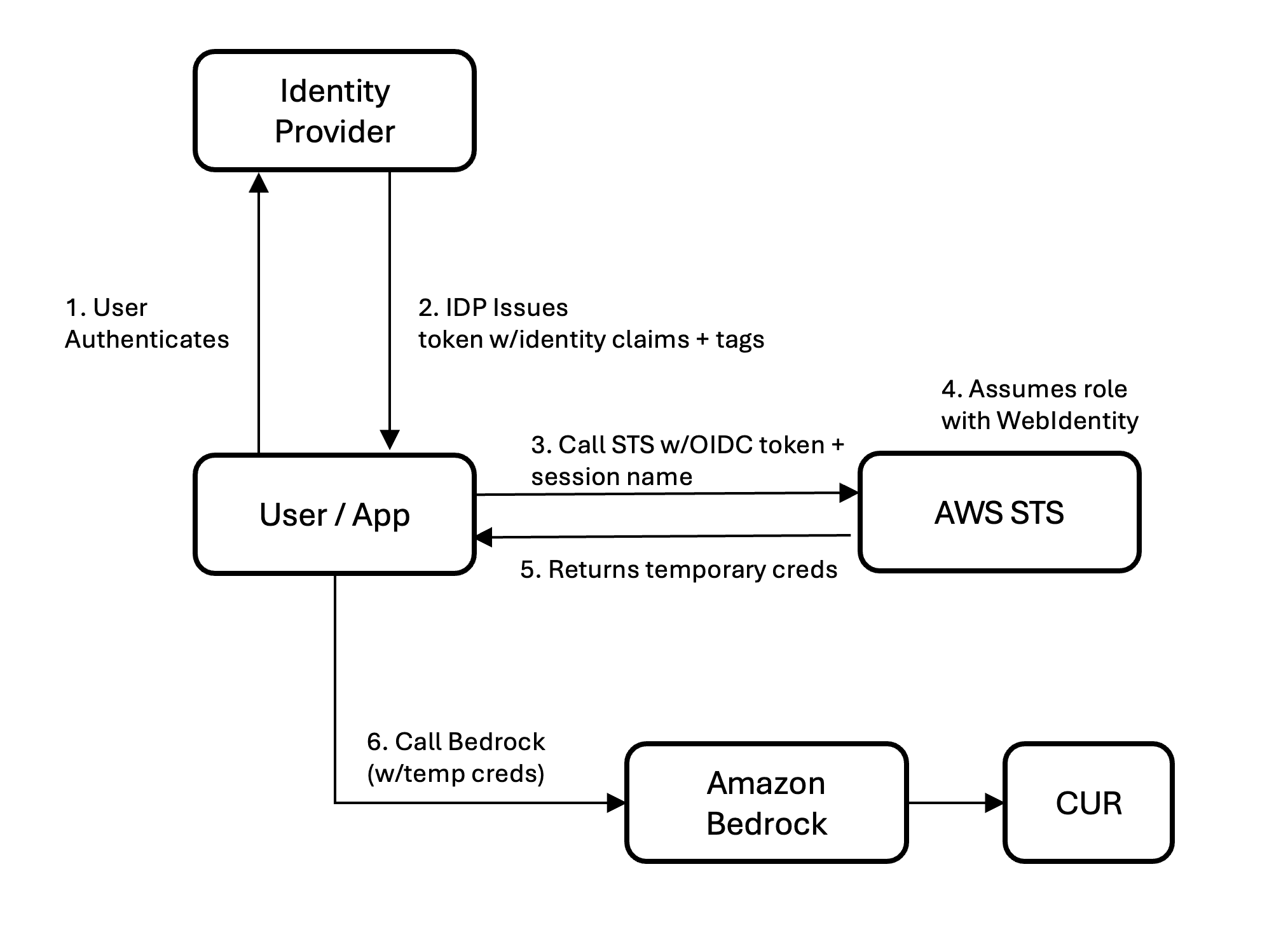
Artificial Intelligence Introducing granular cost attribution for Amazon Bedrock As AI inference grows into a significant share of cloud spend, understanding who and what are driving costs is essential for chargebacks, cost optimization, and financial planning. Today, we’re announcing granular cost attribution for Amazon Bedrock inference. Amazon Bedrock now automatically attributes inference costs to the IAM principal that made the call. An IAM principal can be an IAM user, a role assumed by an application, or a federated identity from a provider like Okta or Entra ID. Attribution flows to your AWS Billing and works across models, with no resources to manage and no changes to your existing workflows. With optional cost allocation tags, you can aggregate costs by team, project, or custom dimension in AWS Cost Explorer and AWS Cost and Usage Reports (CUR 2.0). In this post, we share how Amazon Bedrock’s granular cost attribution works and walk through example cost tracking scenarios. How granular cost attribution works In your CUR 2.0, you can see which AWS Identity and Access Management (IAM) principals are calling Amazon Bedrock and what each is spending when you enable IAM principal data in your data export configuration, as shown in the following example: Here, you can see that Alice is using Claude 4.6 Sonnet and Bob is using Claude 4.6 Opus, and what each is spending in input and output tokens. The following table shows what the line_item_iam_principal column contains for each identity type: Adding tags for aggregation and Cost Explorer To aggregate costs by team, project, or cost center, add tags to your IAM principals. Tags flow to your billing data in two ways: - Principal tags are attached directly to IAM users or roles. Set them once and they apply to every request from that principal. - Session tags are passed dynamically when a user or application assumes an IAM role to obtain temporary credentials or embedded in identity provider assertions. To learn more, see Passing session tags in AWS STS. After activation as cost allocation tags in AWS Billing, both tag types appear in the tags column of CUR 2.0 with the iamPrincipal/ prefix, as shown in the following example: For more guidance on building a cost allocation strategy, see Best Practices for Tagging AWS Resources. Quickstart by scenario Your setup depends on how your users and applications call Amazon Bedrock. The following table summarizes the attribution available in CUR 2.0 for each access pattern and what to configure for tag-based aggregation: Note: For Scenarios 1–3, the line_item_iam_principal column in CUR 2.0 gives you per-caller identity attribution. Tags are only needed if you want to aggregate by custom dimensions (team, cost center, tenant) or use Cost Explorer for visual analysis and alerts. For Scenario 4, per-user session management is required to get user-level attribution. Without it, traffic is attributed to the gateway’s single role. After adding tags, activate your cost allocation tags in the AWS Billing console or via UpdateCostAllocationTagsStatus API. Tags appear in Cost Explorer and CUR 2.0…