Integrating AWS API MCP Server with Amazon Quick using Amazon Bedrock AgentCore Runtime
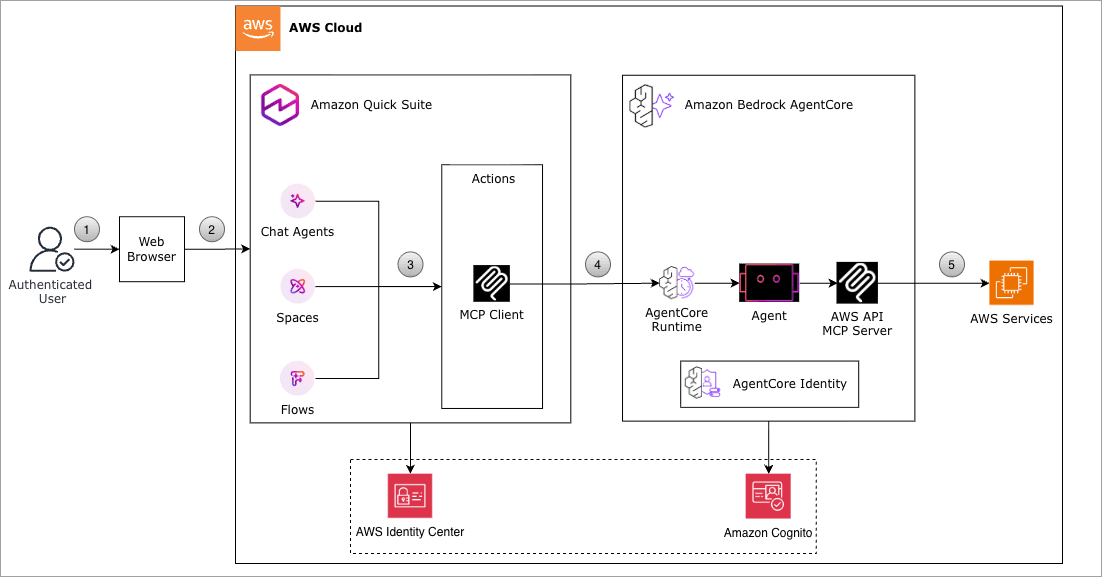
Artificial Intelligence Integrating AWS API MCP Server with Amazon Quick using Amazon Bedrock AgentCore Runtime As your AWS infrastructure scales, operational workflows naturally grow more complex. SREs and DevOps Engineers spend significant time context-switching between the AWS Management Console, CLI documentation, and multiple service dashboards. They manually translate business questions into the correct API syntax, chain calls across services, and rebuild the same integration patterns for each new use case.This friction compounds over time. Incident investigations require cross-referencing Amazon CloudWatch Logs, Amazon Elastic Compute Cloud (Amazon EC2) instance states, and AWS Identity and Access Management (IAM) policies across separate interfaces. Capacity planning means manually querying multiple services and assembling results. Security audits demand consistent, repeatable API call sequences that are time-consuming to script from scratch. This post shows you how to use Amazon Bedrock AgentCore Runtime with Model Context Protocol (MCP) support to connect Amazon Quick with AWS services through the AWS API MCP Server, creating a conversational AI assistant that translates natural language into AWS Command Line Interface (AWS CLI) commands, without the need to switch between tools during critical moments. Solution overview With Amazon Bedrock AgentCore Runtime and MCP support, natural language queries translate directly to AWS API calls. You can ask, “Show me all running EC2 instances in us-east-1,” and get immediate, accurate results without switching between tools or memorizing API syntax. Your requests run securely within your existing IAM permissions, with full Amazon CloudWatch audit trails for compliance. Rather than rebuilding connection logic for each workflow, you can standardize how AI agents interact with AWS services through a single, reusable integration. The following diagram shows how Amazon Bedrock AgentCore Runtime connects Amazon Quick to AWS services through the AWS API MCP Server. How it works for daily operations: - You ask a question in natural language: “Show running EC2 instances in us-east-1”. - The Amazon Quick custom agent interprets your intent. - Amazon Cognito authenticates the request: Quick obtains a JWT token from your Amazon Cognito user pool using OAuth 2.0 client credentials flow with the Client ID and Client Secret you configured. - The agent connects to AWS API MCP Server: The authenticated request reaches Amazon Bedrock AgentCore Runtime, which validates the JWT token against your Cognito identity provider configuration. - AgentCore Runtime authorizes and routes the request: After validating your Cognito token, AgentCore Runtime securely invokes the AWS API MCP Server running in the containerized environment. - The MCP server translates your request: Your natural language query is converted into the appropriate AWS CLI command. - AWS services execute the command: Using the IAM execution role you configured, the command runs with least-privilege permissions against AWS services. - Results are returned in a readable format: No CLI syntax required. You get structured, readable results directly in your Quick interface. Prerequisites You must have the following prerequisites to follow along with this post. Account and access requirements: - AWS account with administrative access - Amazon Quick Enterprise subscription (Professional tier minimum) - Access to AWS…