Configuring Amazon Bedrock AgentCore Gateway for secure access to private resources
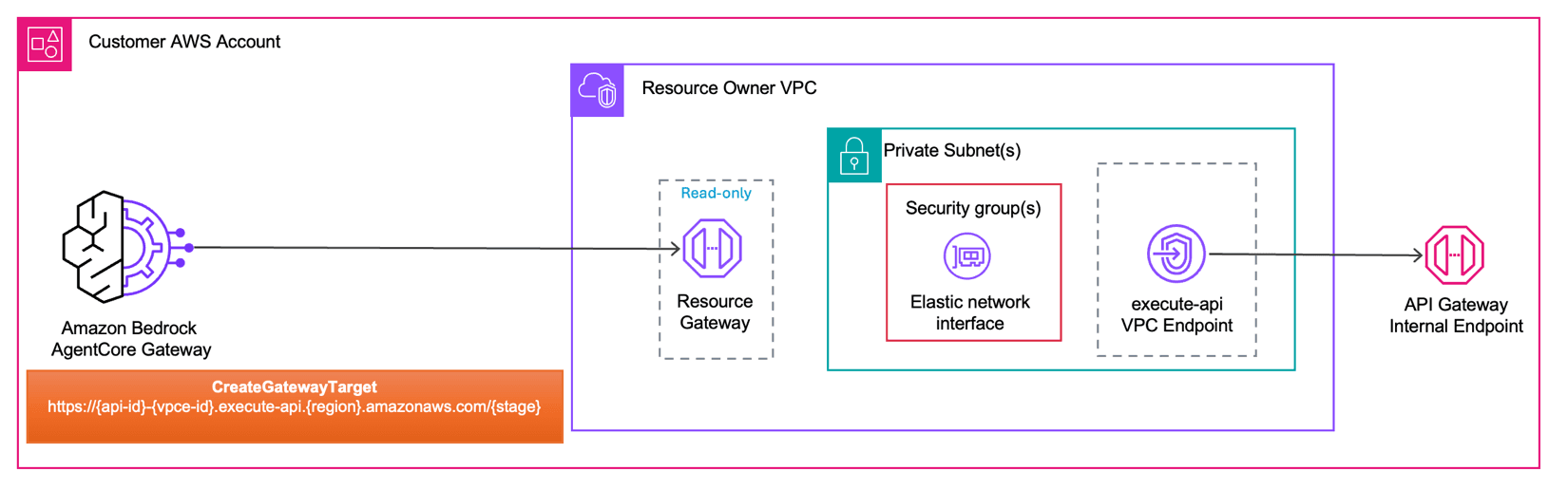
Artificial Intelligence Configuring Amazon Bedrock AgentCore Gateway for secure access to private resources AI agents in production environments often need to reach internal APIs, databases, and private resources that sit behind Amazon Virtual Private Cloud (Amazon VPC) boundaries. Managing private connectivity for each agent-to-tool path adds operational overhead and slows deployment. Amazon Bedrock AgentCore VPC connectivity is designed to deploy AI agents and Model Context Protocol (MCP) servers without requiring the network traffic to be exposed to the public internet. This capability extends to managed Amazon VPC egress for Amazon Bedrock AgentCore Gateway, so you can connect to endpoints inside private networks across your AWS environment. In this post, you will configure Amazon Bedrock AgentCore Gateway to access private endpoints using Resource Gateway, a managed construct that provisions Elastic Network Interfaces (ENIs) directly inside your Amazon VPC, one per subnet. You will explore two implementation modes (managed and self-managed) and walk through three practical scenarios: connecting to a private Amazon API Gateway endpoint, integrating with a MCP server on Amazon Elastic Kubernetes Service (Amazon EKS), and accessing a private REST API. Key terms The following terms are used throughout this post. Review them before proceeding to understand how each component fits into the AgentCore Gateway VPC egress architecture. Resource VPC: The Amazon VPC where your private resource lives. For example, the VPC containing your privately hosted MCP server or API endpoint. This is the Amazon VPC that AgentCore Gateway needs to reach. Resource VPC can either be in the same AWS account as the AgentCore Gateway account or in a different account. AgentCore Gateway account: The AWS account where you create and manage your AgentCore Gateway resources. This account may or may not be the same account as the Resource VPC. Resource Gateway: Resource gateway acts as the private entry point into your Resource VPC. When created, it provisions one ENI per subnet that you specify, each sitting inside your VPC. Traffic from AgentCore Gateway to your private resource arrives through these ENIs. Resource Configuration: Resource configuration for VPC resources defines the specific resource AgentCore Gateway is allowed to reach through the Resource Gateway, identified by a domain name, or IP address. Rather than granting access to your entire Amazon VPC, a Resource Configuration scopes connectivity to a single endpoint. Service Network Resource Association: A service network resource association connects a resource configuration to the AgentCore service network, which allows AgentCore Gateway service to invoke your private endpoint. AgentCore creates and manages this association on your behalf, regardless of which mode you use. How does AgentCore Gateway VPC egress work? AgentCore Gateway VPC egress supports two modes depending on how much control you want over the underlying networking infrastructure and how you want to architect for cross-VPC connectivity. Managed VPC resource In this mode, AgentCore Gateway handles everything on your behalf. You provide your VPC ID, subnet IDs, and security groups as part of your target configuration, and AgentCore automatically creates and manages the VPC Resource Gateway in your account.…